How to Fill Out Korea's e-Arrival Card in 2026
Published Last verified
Korea’s e-Arrival Card is the electronic replacement for the paper arrival card. It is free, it is filled in online before you fly, and the part that catches people is not any of the fields.
It is this: being exempt from K-ETA does not exempt you from this form. It puts you on the list of people who have to file it.
⚠️ The one that catches everyone
On the official list of people subject to the declaration, entry 02 is “K-ETA exempt individuals”. On the list of people excluded from it, entry 03 is “K-ETA holders”. Those are not the same group — they are opposites. The exclusion rides on an approved K-ETA, so a waiver that means you never applied for one leaves nothing to carry it.
Before you start: you are on the right site
The homepage opens with its own fraud warning. Fake sites impersonating the
service have been found, and the official one is www.e-arrivalcard.go.kr and
nothing else. The tell is money:
The test
There is no fee. Any site asking for payment information is not the official service — that is the official site's own wording, not ours.
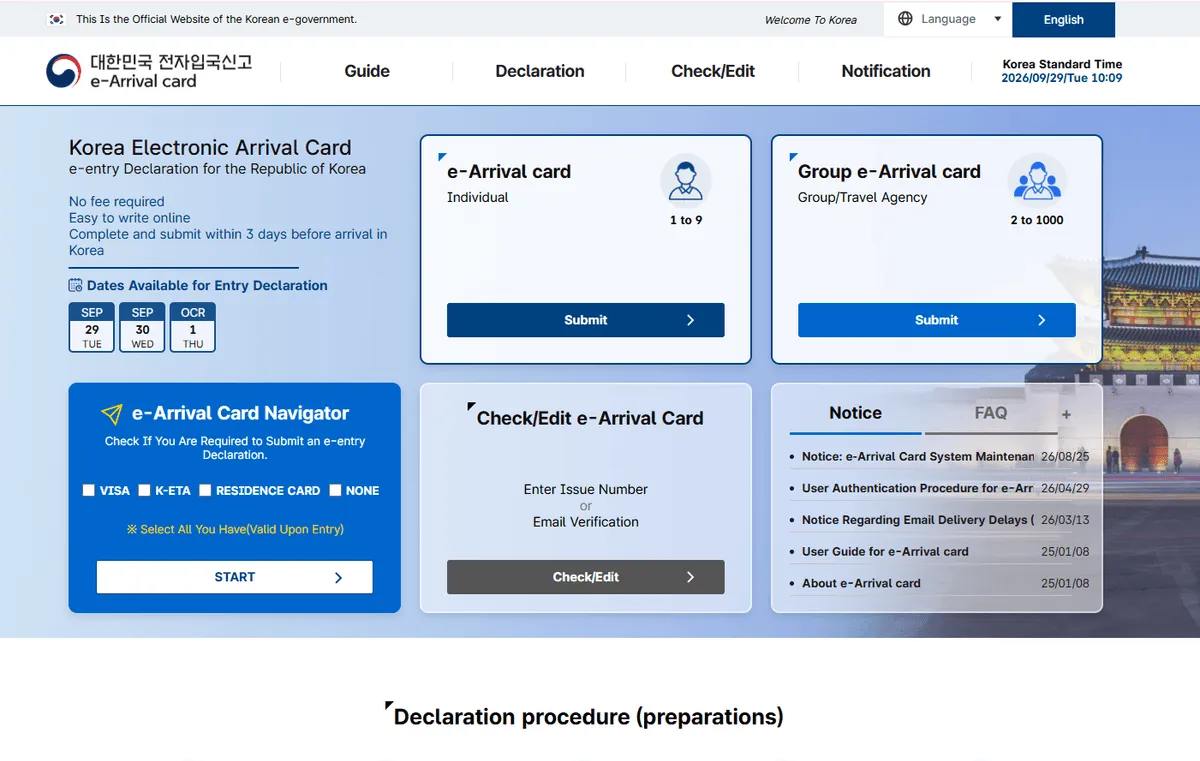
Two ways in — Individual for 1 to 9 people, Group/Travel Agency for 2 to 1000. The dates panel on the left is the three-day window.
The homepage also shows the dates it will currently accept. On 29 September it listed 29 September, 30 September and 1 October: the arrival day plus the two after it. Within three days of arrival, in other words — this is not something you can file when you book.
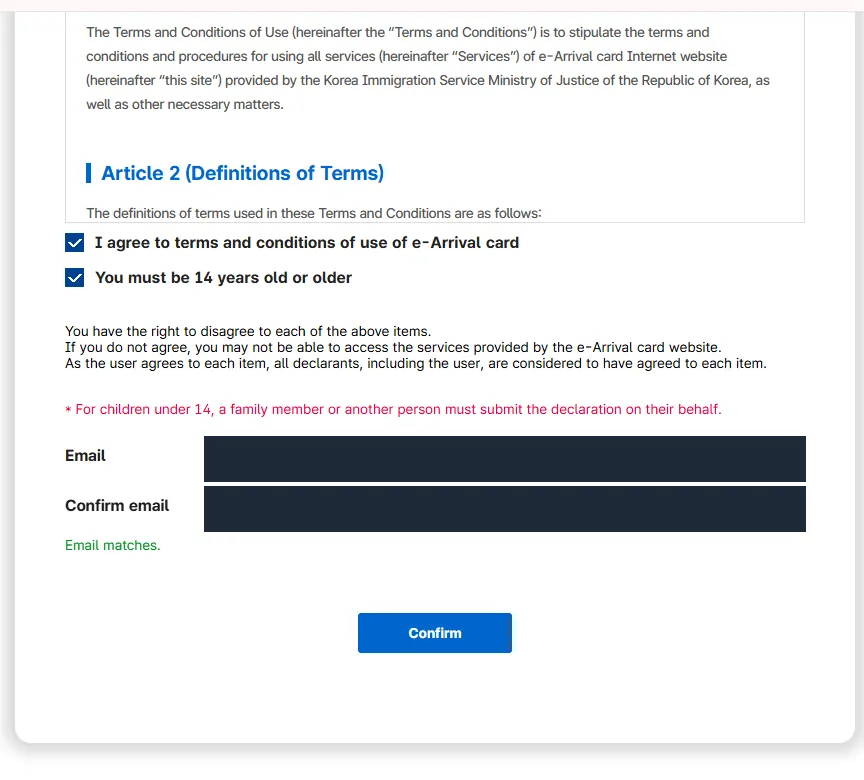
The email goes in twice and the screen prints “Email matches.” when they agree. The red line above it is the one families need: under 14, somebody else files.
The eleven screens, in order
KE000 is the example given.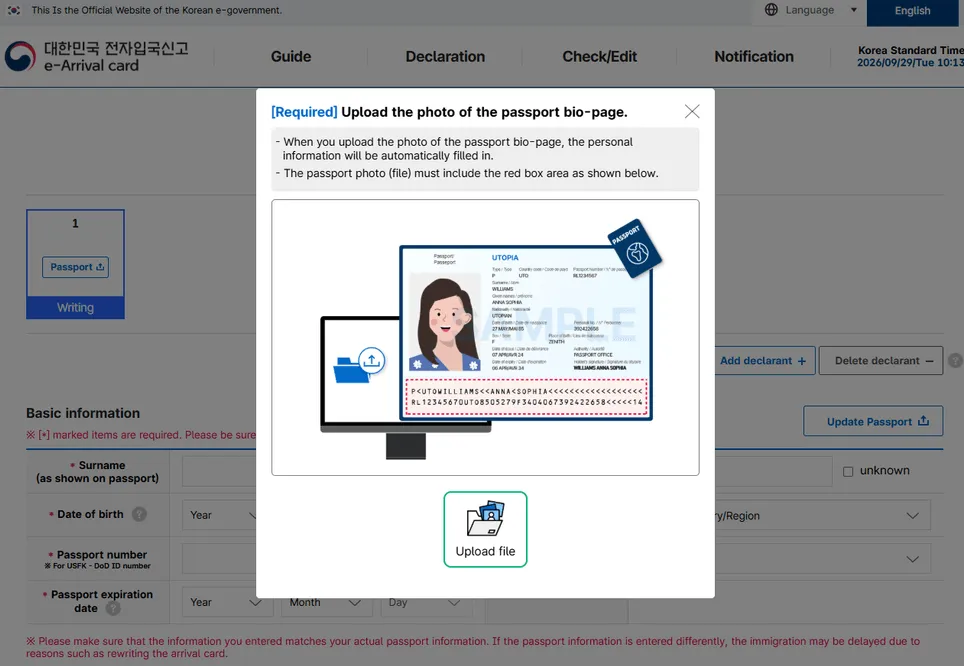
The red box on the sample is the instruction: the whole bio page, machine-readable zone included. Crop it out and the scan has nothing to read.
What the form treats as required
The consent screen lists it outright, which is useful because it tells you what to have in front of you before you open the form.
REQUIRED                           OPTIONAL
─────────────────────────────      ─────────────────────────────
Email                              Departure flight number
Nationality                          (or ship name)
Gender                             Previous place of departure
Name                               Next destination
Date of birth                      Visa information
Passport number                    DoD ID number (USFK)
Passport expiration date
Occupation
Residence information
Purpose of entry
Date of entry
Arrival flight number (or ship)
Departure date
Retention of the collected data is shown as semi-permanent.
Under 14: somebody else files for you
The terms screen carries two checkboxes — agreement to the terms, and “You must be 14 years old or older” — and then the line that matters for families:
Children
For a child under 14, a family member or another person has to submit the declaration on their behalf. The child cannot be the declarant.
The passport upload does not finish the job
Upload the bio-page and the site reads it: surname, given name, date of birth, passport number, expiry date and sex all come back filled in. Then it tells you to check them.
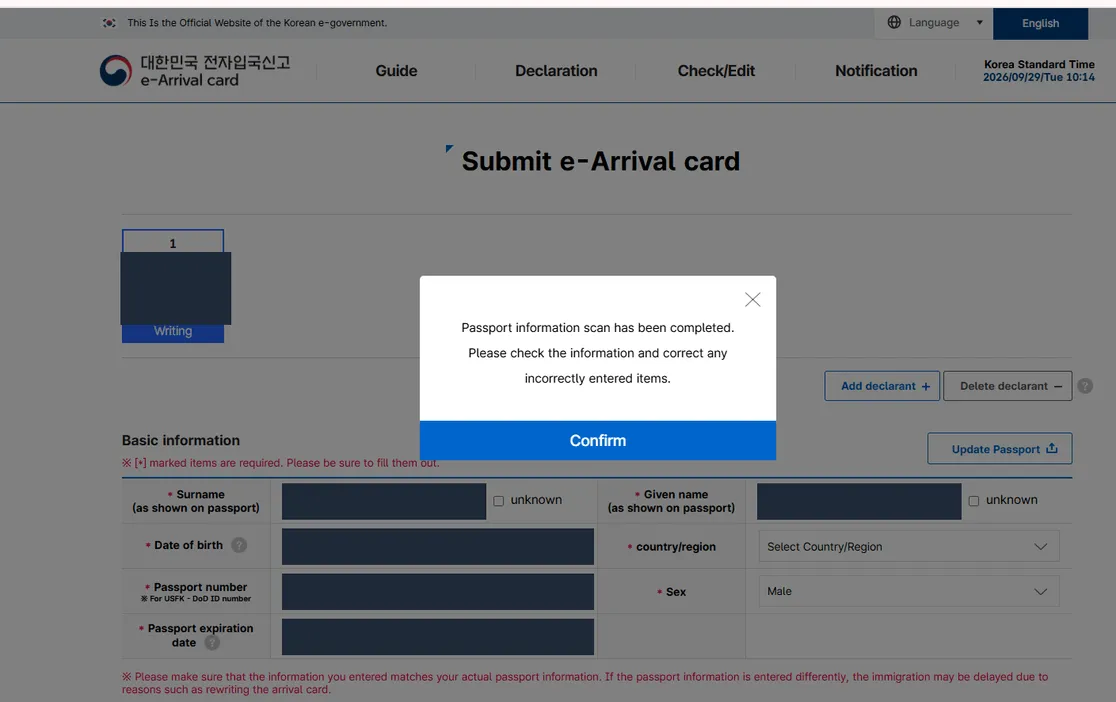
Read the row on the right: country/region is still “Select Country/Region” while everything else came back filled. Personal values are masked here.
That instruction is worth taking literally. In our run the scan populated the name and passport fields but left country/region as “Select Country/Region” — an unfilled dropdown in the middle of a form that otherwise looks finished. The country list is a searchable A-to-Z, so it is a ten-second fix, but only if you notice it.
The page also carries a red warning under the basic information block: if the passport details you submit differ from your actual passport, immigration can be delayed while the card is rewritten. The scan is a convenience, not a verification.
Purpose of entry — the eleven options
This is the dropdown people guess at. The exact wording:
Tourism (Individual)          Meeting/event
Tourism (group)               Employment
Business                      Studies
Diplomacy/Official duties     Sports game
Treatment/Medical care        Others
Visit (Family/relatives/friends, etc.)
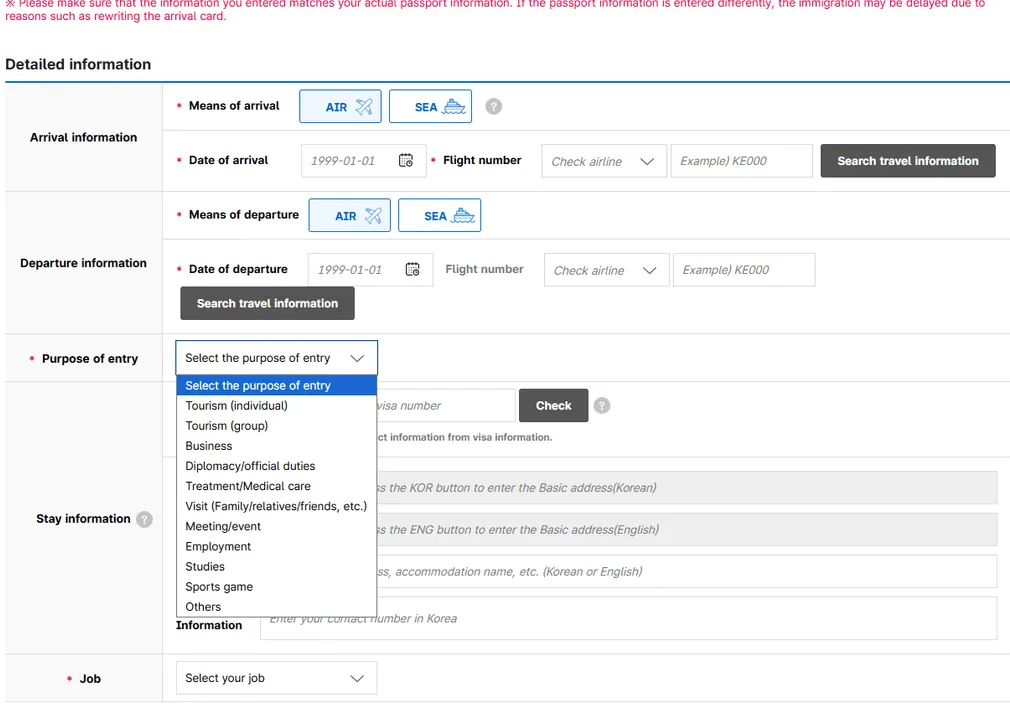
All eleven, as worded on the form.
Two notes. Business and Meeting/event are separate entries, so a work trip is not automatically “Business” — a conference or a trade event has its own option. And Visit (Family/relatives/friends, etc.) exists, so seeing relatives is not “Tourism”.
⚠️ This box is not where your entry route is decided
Picking “Business” here does not grant you anything, and picking “Tourism” does not protect you. Whether a short business visit is inside visa-free entry is settled before you reach this form — the visa-free purposes are travel, visiting relatives, attending events or conferences, and business purposes with no commercial activities allowed. The line is the commercial activity, not the word.
Job — the eight options
Office worker                 Household activities
Self-employed                 Public official
Student                       Agriculture and livestock industry
Unemployed                    Others
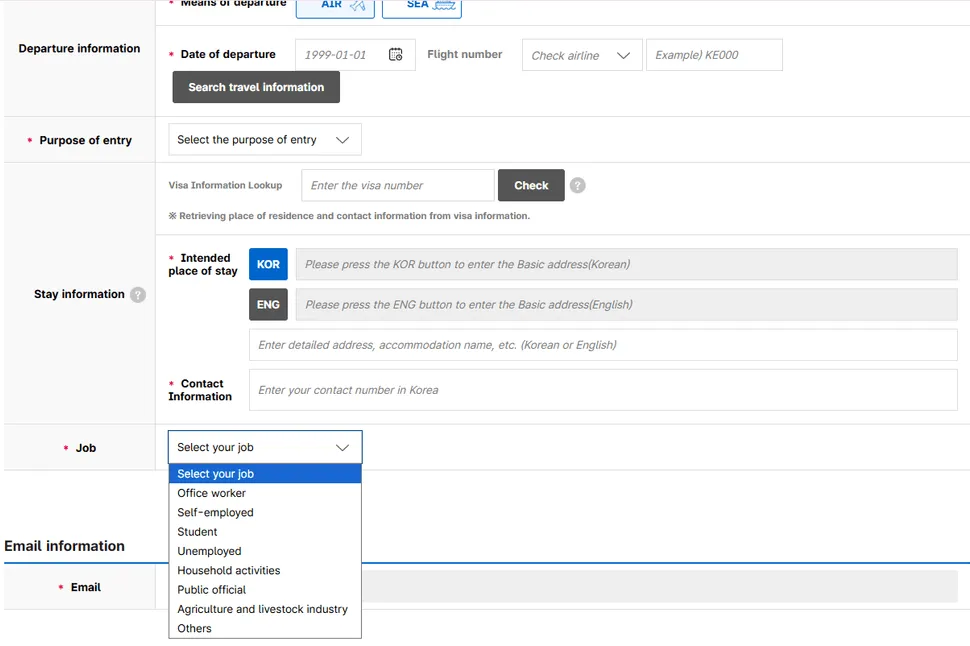
One screen holds the three fields that stall people: the visa lookup, the KOR / ENG address buttons, and Job.
There is no “retired” and no “freelancer”. Most readers land on Office worker, Self-employed or Student.
The Korean address is the field that stalls people
The address box has two buttons — KOR and ENG — and each opens a lookup. The English one comes with a guide, and its rules are specific:
-ro, -gil, -daero, -beon-gil.The site’s own worked example, using a building anyone can look up:
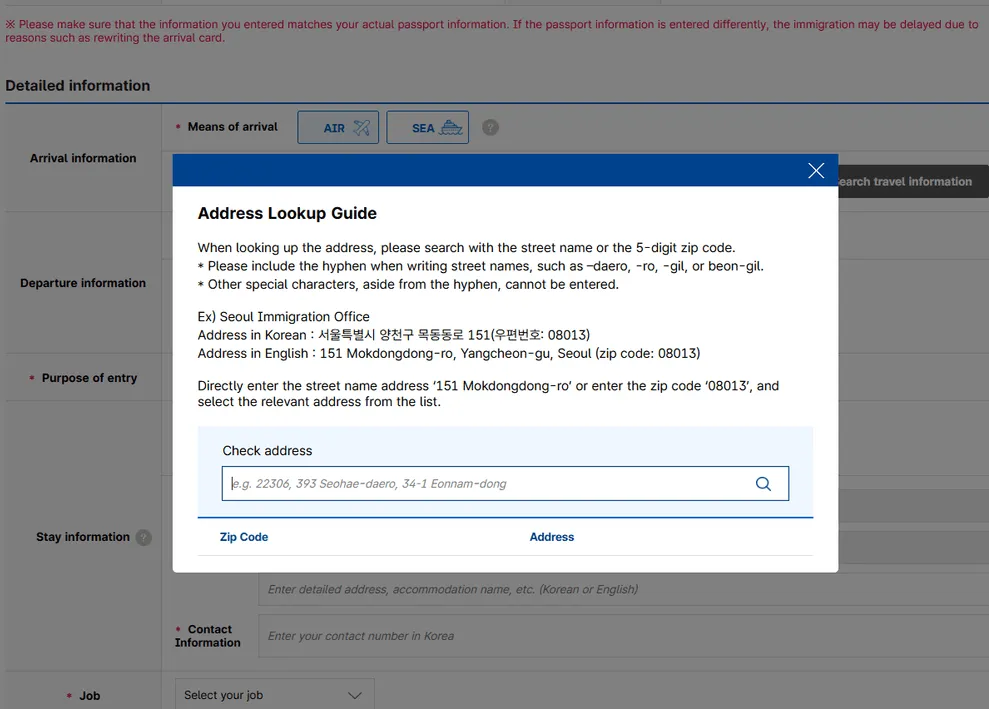
The guide the ENG button opens, with its own worked example.
Korean    서울특별시 양천구 목동동로 151 (신월동, 08013)
English   151 Mokdongdong-ro, Yangcheon-gu, Seoul   zip 08013

Search either  "151 Mokdongdong-ro"   or   "08013"
then pick the matching address from the list.
Once the base address is in, the second box takes the rest: “Enter detailed address, accommodation name, etc.” — the hotel name, the unit number, the floor. Korean or English both accepted.
For a hotel, search the hotel’s street address and put the hotel name in the detail box. For an Airbnb or a friend’s place, use the address you will actually sleep at.
Where this sits among the four things people confuse
Four questions, four answers
They are decided separately, and in this order
Visa-free entry   Can you enter without a visa, and for how long?
      ↓
K-ETA             If entering without a visa, is prior authorisation needed?
      ↓
Visa              If not visa-free, which visa matches the purpose?
      ↓
e-Arrival Card    Whatever the answer above, do you file this declaration?
The last one does not follow from the others. It is decided by what you actually enter on:
| You enter on | e-Arrival Card |
|---|---|
| An approved K-ETA | Excluded |
| A Korean Residence Card | Excluded |
| A group (electronic) visa | Excluded |
| A Korean visa | File it |
| A K-ETA you hold, but a visa you enter on | File it |
| A K-ETA exemption (country waiver, age, diplomatic passport) | File it |
| A valid ABTC | File it |
The official site’s own navigator makes the same point in its wording: it asks you to select what you have “used upon entry”, not what you hold.
Not sure which row is you?
The Korea entry requirements check answers the three separately — visa-free scope and how long you get, whether K-ETA applies, and whether you file this — and links the official page each answer was read from.
If the answer is that you need a K-ETA, the application walkthrough covers the screens, including the two warnings that decide whether it goes through first time.
Before you press Submit
If something is wrong after submission, the homepage has a Check/Edit panel: enter the issue number, or verify by email.
The short version
Free, on the official site only, within three days of arrival. The passport upload does most of the typing and none of the checking. The two fields that actually cost people time are the Korean address and the country/region the scan skipped.
And the thing worth carrying away: a K-ETA exemption is not an e-Arrival exemption. It is the reason you are filing.
Frequently asked questions
- I am exempt from K-ETA. Does that mean I skip this too?
- No — and it is the opposite of what most people assume. "K-ETA exempt individuals" is its own entry on the official list of people who must submit the declaration, while "K-ETA holders" sits on the excluded list. The exclusion rides on an approved K-ETA, so being waived out of K-ETA removes the very thing that would have carried it. Every route out of K-ETA — the temporary country waiver, being under 17 or over 65, holding a diplomatic or service passport — lands you on the filing side.
- I have an approved K-ETA and a Korean visa. Which one counts?
- Whichever one you actually enter on. The official page prints the exception on the exclusion itself: individuals holding a K-ETA but entering with a visa must complete the e-Arrival card. This is the single case where two documents that both look like exemptions give opposite answers, and possession does not settle it. The site's own navigator asks you to select what you have "used upon entry" for exactly this reason.
- Does a valid ABTC get me out of it?
- No. APEC Business Travel Card holders are named on the must-file list in their own right. The card waives K-ETA and stops there — the two are separate filings, and this is the point the card is most often assumed to cover. Separately, the site defines what counts as a valid ABTC: personal details matching exactly, remaining validity, the passport number written on the card, and the approval country code KOR displayed. Mobile cards count.
- Is there a fee?
- No. The official site states plainly that no fee is required, and its own homepage warning says any site asking for payment information is not the official service. Fake sites impersonating it have been found. The only address is www.e-arrivalcard.go.kr.
- How far ahead can I submit it?
- The site accepts declarations within three days of arrival and shows you the exact dates it will take. On 29 September it offered 29 September, 30 September and 1 October — the arrival day itself plus the two following. You cannot file it months ahead, so it is not something to get out of the way when you book.
- The passport scan filled everything in. Can I just submit?
- Check it first. The upload does populate surname, given name, date of birth, passport number, expiry and sex, but it does not finish the form — country/region was still left to select manually in our run, and the site itself tells you to review and correct after the scan. The page carries a red warning that a mismatch against your actual passport can delay immigration while the card is rewritten.
Last verified:
Official sources
- Korea e-Arrival Card — official declaration site
- Korea e-Arrival Card — individuals subject to and excluded from declaration
- Korea e-Arrival Card — declaration navigator
- K-ETA — eligible countries and permitted period of stay
Revision history
- Published
Figures here are re-checked against their official sources at least every six months. Substantive changes — a rate, a cap, a rule — are logged above rather than silently overwritten, and collected site-wide inupdates & revisions.
This article is general information, not financial, legal, or tax advice. Requirements and figures change; confirm the current rules with the official sources above before making decisions.