How to Apply for K-ETA in 2026, Step by Step
Published Last verified
⚠️ K-ETA is down 8–9 October 2026
The site, the application and results lookup are all offline from 18:00 on 8 October to 02:30 on 9 October, KST. A saved draft not paid for by 18:00 on the 8th cannot be retrieved afterwards. Assessment can take up to 72 hours, so if you fly near those dates, apply before the window rather than after it.
The hard part of K-ETA is not the form. It is knowing whether you should be applying at all — and then noticing that the passport scan typed something slightly wrong.
This is a walkthrough of the official application at www.k-eta.go.kr, taken
screen by screen. Four things on it are worth knowing before you start, and
none of them appears in the summaries.
Four things the screens tell you that guides do not
All four came off the application itself
What the site says it costs and how long it takes
Straight off the homepage:
Fee                   KRW 10,000        (about USD 7–8)
Assessment            generally within 72 hours
Where                 www.k-eta.go.kr, or the K-ETA mobile app
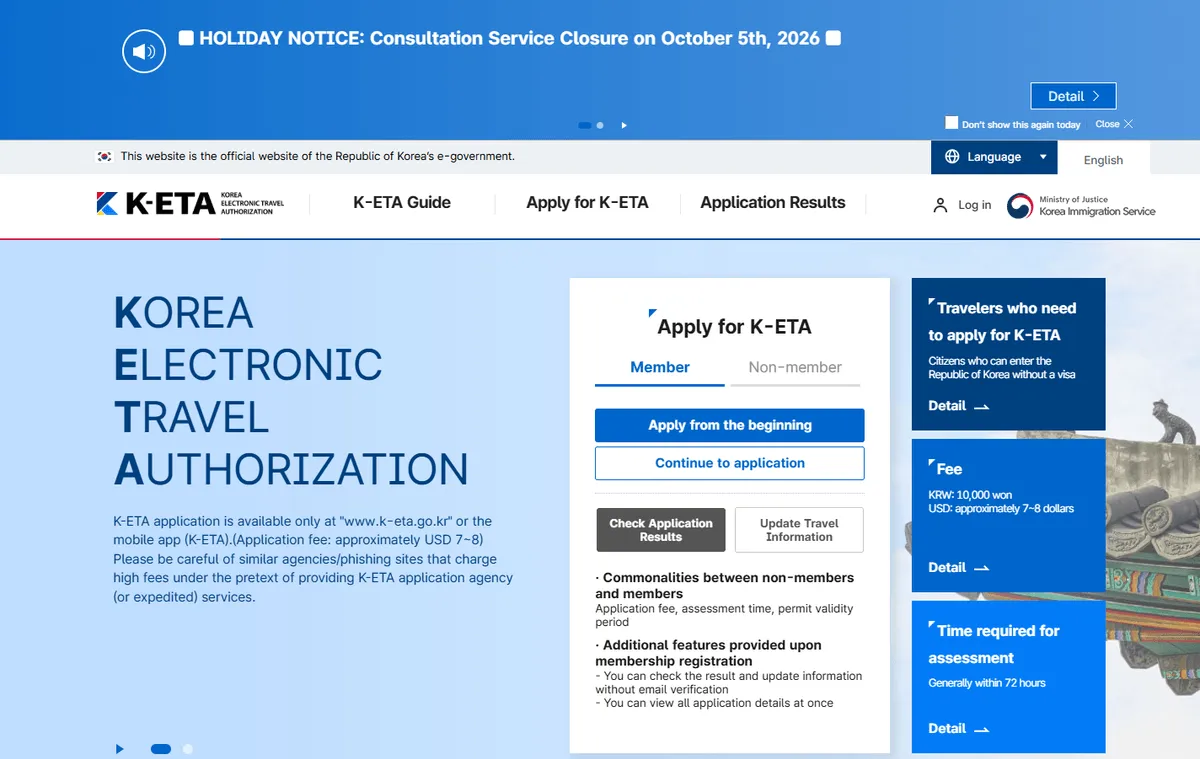
Fee and assessment time are stated on the homepage, next to its own warning about agencies charging high fees for “expedited” services.
The fee page adds an online payment processing charge of roughly 3% on top, and states that the fee covers processing the application — it is not refunded if the application is denied.
The homepage carries its own warning about this, and it is worth reading as written: be careful of similar agencies and phishing sites charging high fees under the pretext of providing K-ETA application agency or expedited services. There is no official fast track. The 72 hours is the 72 hours.
⚠️ Check eligibility before you pay, not after
The fee is not refunded if the application is denied, and the temporary exemption means some travellers are paying for something they do not currently need. Settle “do I need this” first.
Card only, and what to do when one is refused
The official guide states the fee is payable by international credit and debit cards — Visa, Mastercard, JCB, American Express, Diners Club, Discover, UnionPay and Alipay+ — and that bank transfer and similar methods are not accepted. There is no transfer or cash route to fall back on.
When a card is refused, the guide gives its own order to work through: try a different connection, switching between Wi-Fi and mobile data, then a different card that is enabled for overseas payments. If neither helps, it says to ask your card company two specific things — whether the card is enabled for overseas online payment, and whether it is enrolled for 3-D Secure. A card that works perfectly at home can fail either test without ever having shown it.
One detail that only reaches holders of Korean-issued cards: the form asks you to select by the card company, not the bank that issued the card. The bank is not on the list, and looking for it is the dead end.
Whether a particular card will go through is not something this page or the official one can settle in advance. It turns on the issuer, the card’s overseas payment setting and its 3-D Secure enrolment — which is why the guide sends you to the card company rather than answering it.
The seven steps, as the site numbers them
STEP 1   Terms and Conditions Agreement
STEP 2   Email Verification
STEP 3   Enter Passport Information
STEP 4   Enter Application Information
STEP 5   Check Information
STEP 6   Make Payment
STEP 7   Application Complete
A progress rail across the top of every screen shows which one you are on.
Member or non-member
Two tabs on the homepage. The site states the commonalities itself: the application fee, the assessment time and the permit validity period are the same for both.
What membership adds is narrower than people assume — you can check results and update travel information without going through email verification again, and you can see all your applications at once. For one trip, non-member and Apply from the beginning is the shorter path.
STEP 1 — Four consents, not one
The terms screen splits into four separate agreements, and the required block is broader than most travellers expect.
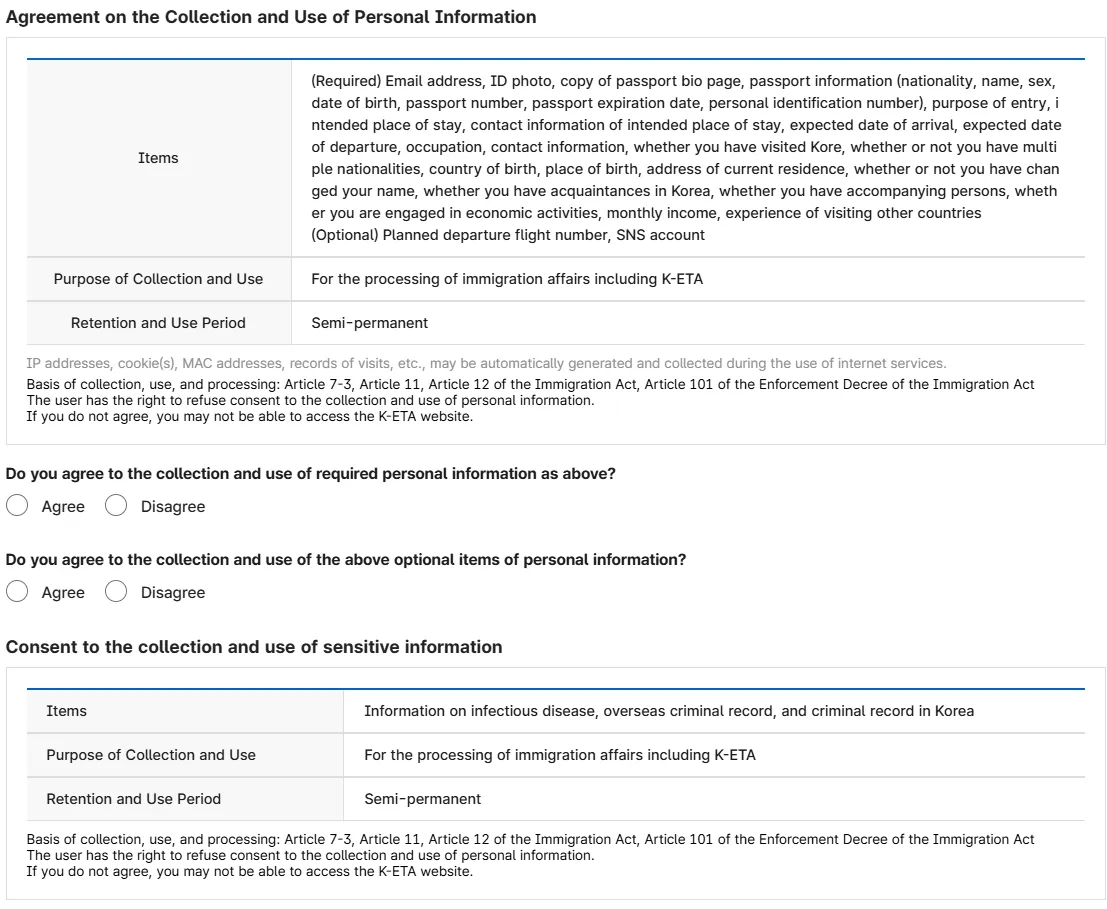
Three consent blocks on one screen. The sensitive one covers infectious disease and criminal record.
Retention is listed as semi-permanent, and the basis given is the Immigration Act and its Enforcement Decree.
Then one question that catches families:
Are you 14 or older?
The screen asks, and adds that when applying as a non-member, a child under 14 cannot be designated as the Representative. Someone else has to hold that role.
STEP 2 — Email verification, and the Gmail problem
Enter an address, press Send Verification Code, and a six-digit number
arrives with the subject [K-ETA] Application Authentication number. Paste it
in and press Verify; the screen answers Verification succeeded.
You have five minutes. The timer beside the Verification Number field
starts at 05:00 and counts down from the moment the code is sent — the limit
belongs to the entry screen, not to the email sitting in your inbox. A
Resend button sits next to it, so a code that runs out is not the end of
the application.
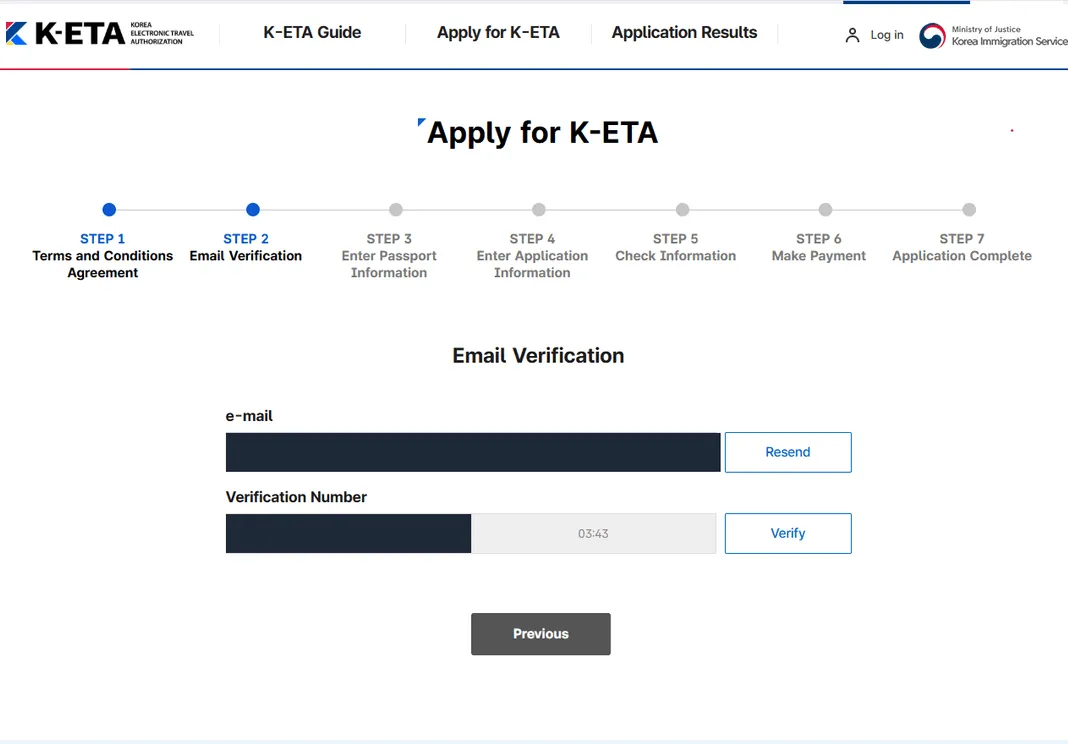
The timer sits between the code field and Verify. Email and code are masked here.
The part worth planning around is what the site displays the moment the code is sent:
⚠️ The site's own words
“The verification number has been sent. Please note that verification codes may be delayed when using Gmail. If you do not receive the code, we kindly request that you use a different email address.”
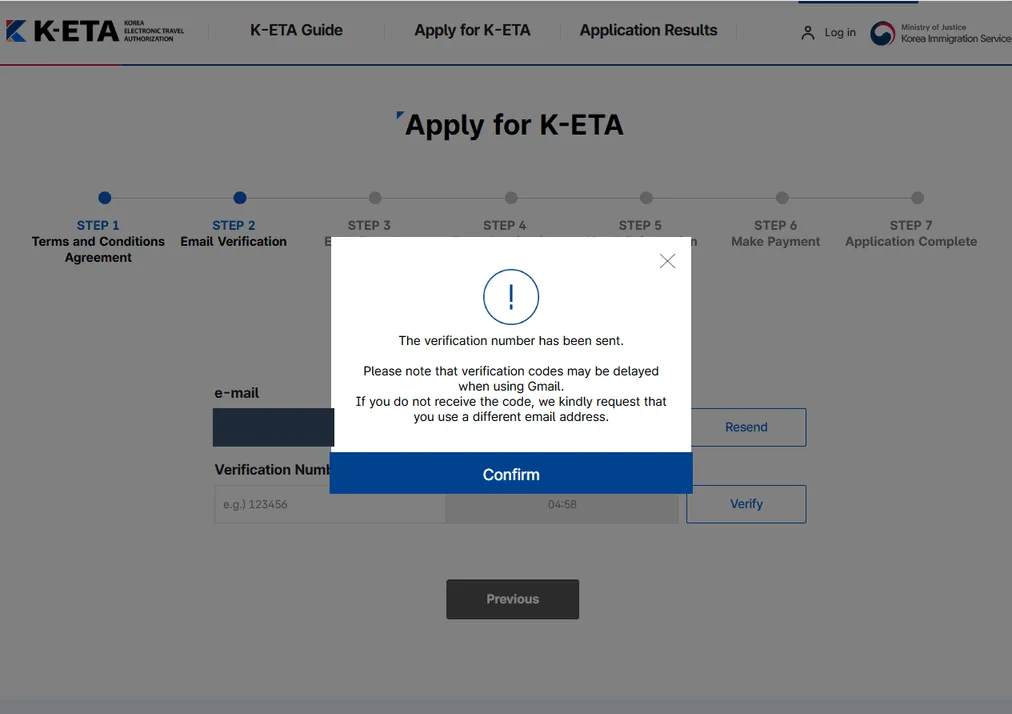
The timer behind the popup reads 04:58 — this is the moment the code was sent.
A government site naming one mail provider is unusual enough to take at face value. If you have a non-Gmail address, use it here — and remember the address is how you will check the result afterwards as a non-member.
STEP 3 — The passport upload
Upload a photo of the passport information page. The sample the site shows
marks a red box around the whole bio page including the machine-readable zone
at the bottom — those two lines of <<< characters have to be in the frame.
Once uploaded, the personal information is filled in automatically.
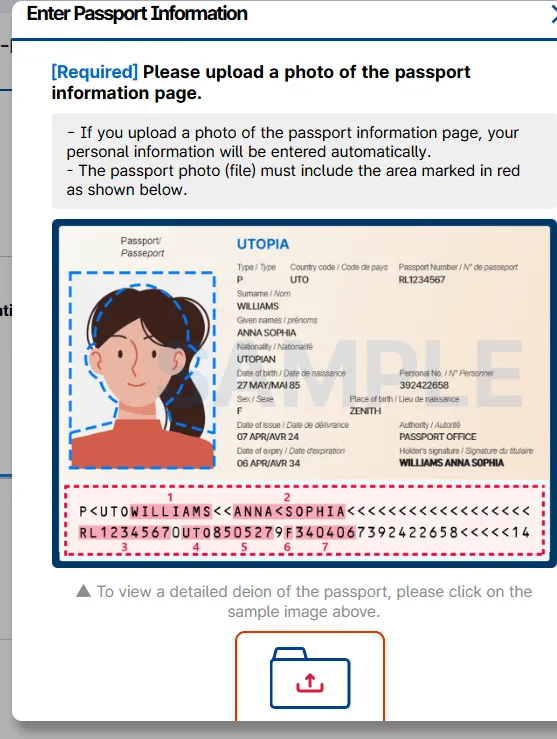
The specimen the site shows. The red dashes mark the part people crop off.
Before the upload dialog will let you proceed, a warning appears. This is the strongest language anywhere in the application:
⚠️ AI enhancement
“AI enhancement may cause image distortion. Please do not use AI photo editors when taking a passport photo. The passport bio-page image uploaded for your application must match the passport you present at immigration control. Any modification, alteration, or forgery of the image is strictly prohibited. Failure to comply may result in the denial or cancellation of your application and may lead to legal penalties under relevant laws, including the Immigration Act.”
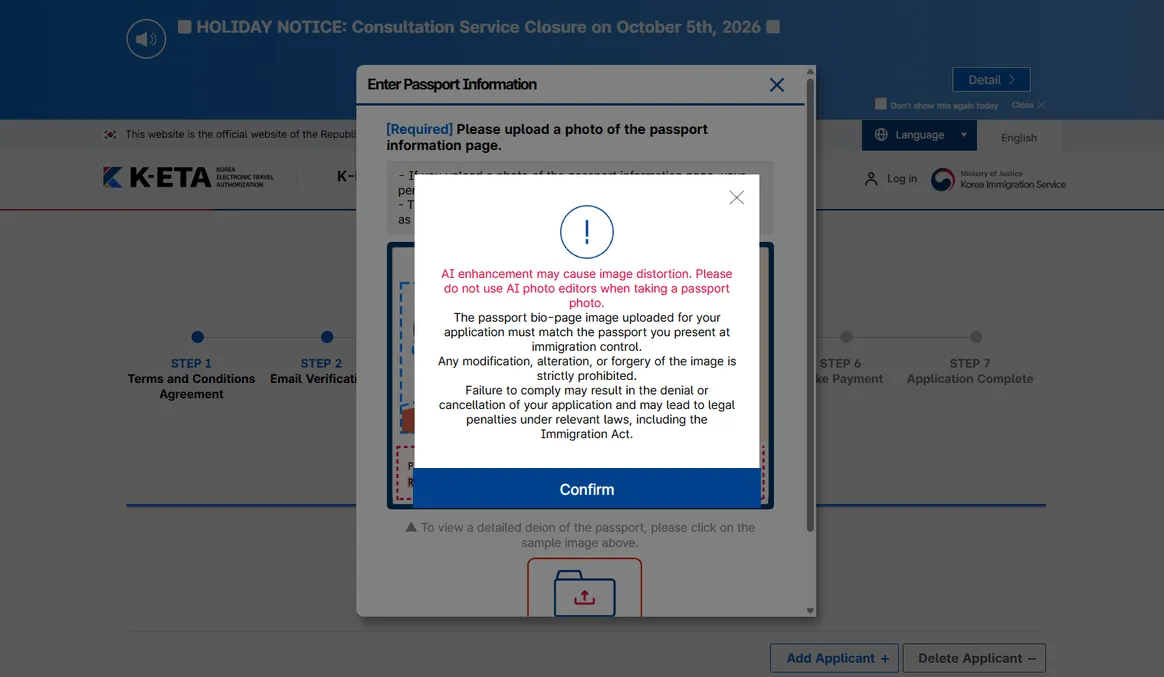
The only place in the application where the Immigration Act is named.
This rules out more than forgery. Phone cameras now ship with generative “enhance” and “clean up” features that rewrite characters they think are blurred — and a passport number is exactly the kind of small, high-contrast text those tools rebuild. Turn that off before you photograph the page.
After selecting the file, the site opens a small editor with three tools:
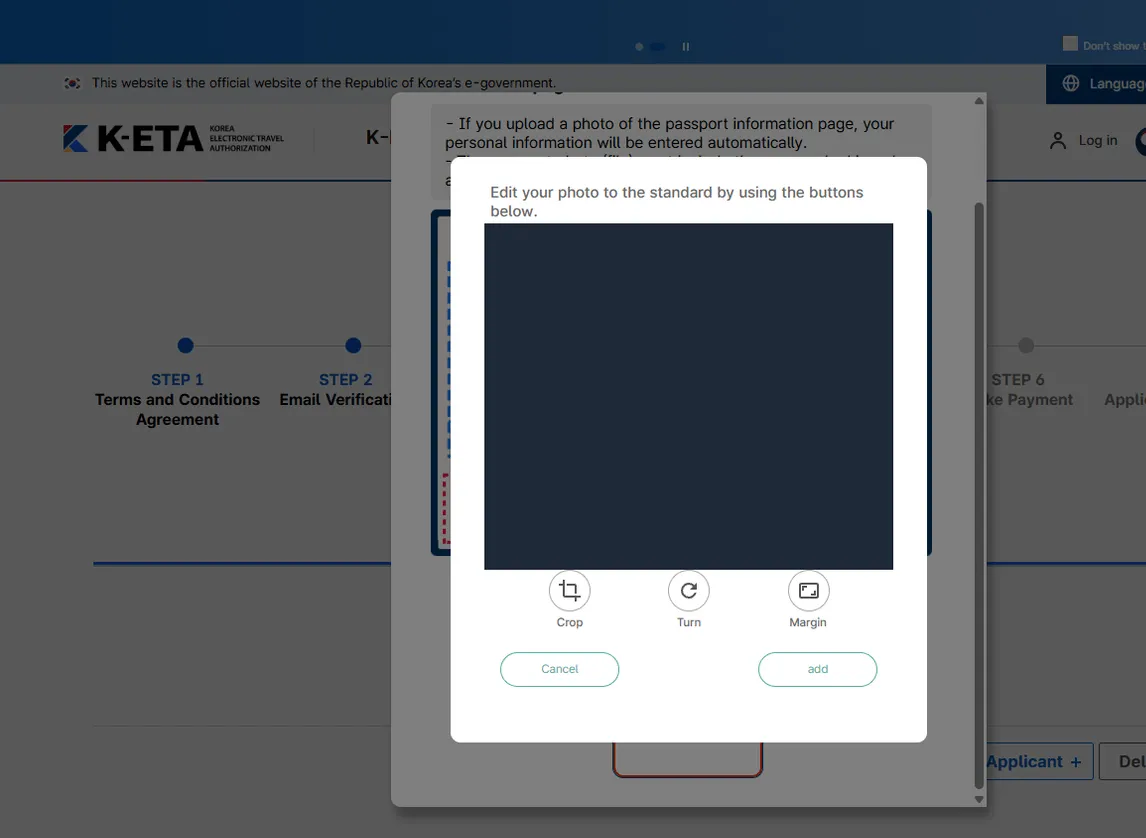
The uploaded passport is covered here. The point of the figure is the row of buttons under it — Crop, Turn, Margin, and nothing else.
Crop, Turn, Margin, and an add button. That is the extent of the editing you are meant to do — make the page readable, straight and fully in frame. Keep both the printed details and the MRZ inside the crop.
STEP 3 continued — check what the scan typed
The recognised values come back as a form: Nationality, Surname, Given Name, Passport Number, Sex, Date of Birth, Passport Expiration Date. Above them sits a warning that tells you exactly where to look:
⚠️ O and 0
“In some cases, contamination or light reflection of your passport bio page may cause incorrect input of your passport information. Please double-check to ensure the information is correct. (※ In particular, please exercise caution when distinguishing between the letter 'O' and the numeral '0'.) The applicant is responsible for any problems that arise from failing to double check incorrect information.”
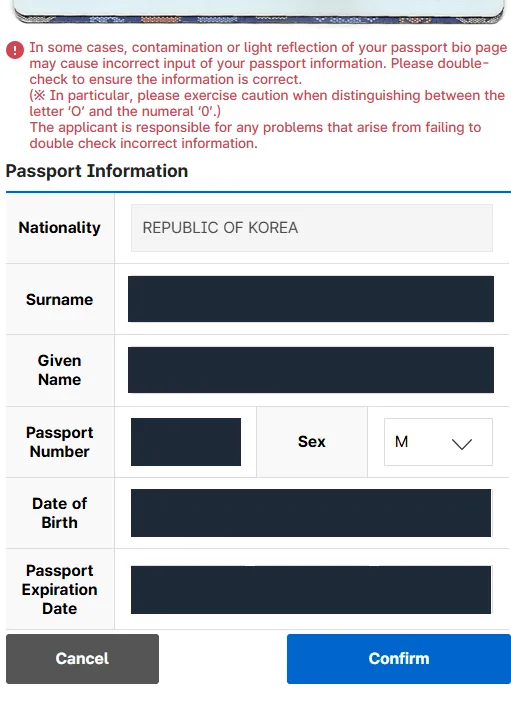
Nationality is left visible because it is what the next screen acts on. Every other value is masked.
That last sentence is the operative one. The scan is a convenience and the error is yours.
STEP 3 ends — the nationality check
This is the part no summary shows, because you only see it if you are not eligible.
Confirm the passport information and the system checks the nationality it just read. Ours was a Republic of Korea passport, used to document the process, and the application stopped:
This is not a country eligible for K-ETA application.
Please check your nationality.
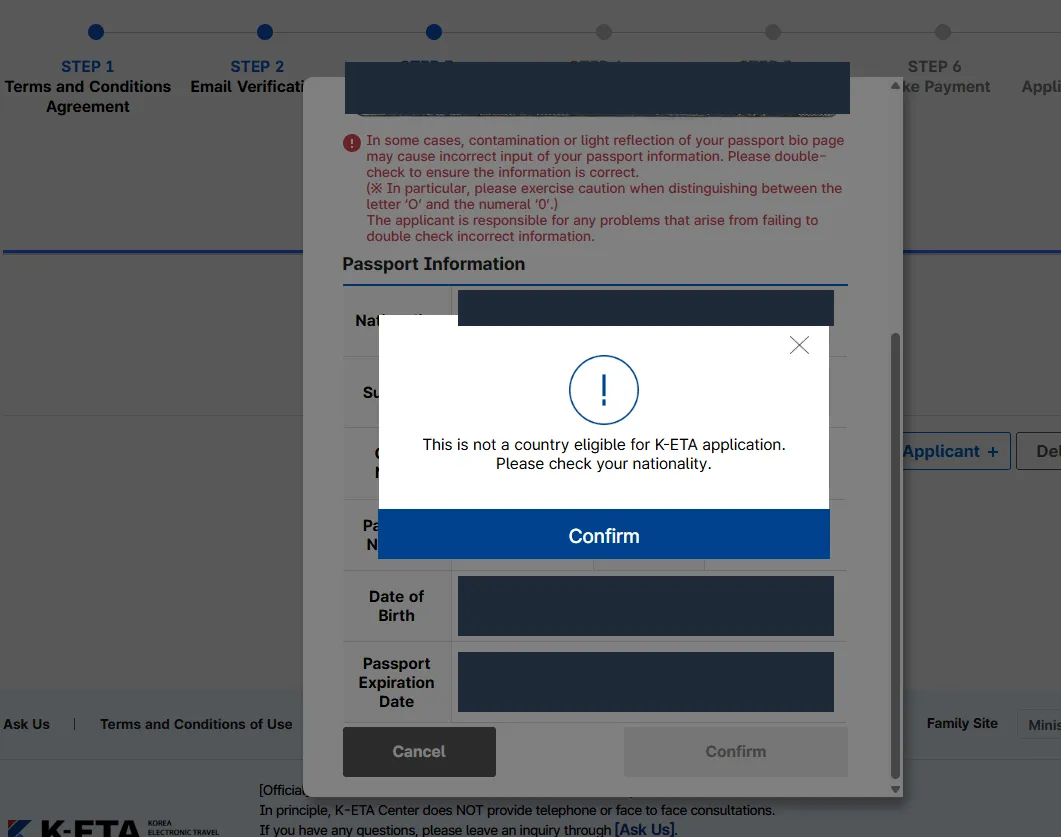
The application stops here. Nothing has been paid at this point — the payment screen is three steps further on.
Which is correct — a Korean national does not apply for K-ETA. Two things follow from seeing it.
The check is real, and it is late. The site is not taking any passport and walking it to the payment screen. But it also does not run the check until after you have consented, verified an email, photographed a passport and uploaded it. Settle your eligibility on the guide pages first rather than letting the form tell you at step three.
We stopped there. We did not enter a different nationality or use someone else’s passport to see the remaining screens. The warning two sections up says what that would be, and a walkthrough is not worth it.
So the rest of this is the official procedure rather than our screens, and it is marked as such.
STEPS 4 to 7 — what the official guide says happens next
Do not apply the day before you fly
Assessment is generally within 72 hours, which is not the same as a maximum, and the site says so. There is no official expedited service to fall back on if it runs long, and the fee is gone whether or not the answer arrives in time.
Four things, and none of them replaces another
Before the last section, the orientation that saves most of the arguing:
| What it decides | |
|---|---|
| Visa-free entry | Whether you may enter Korea at all without obtaining a visa |
| K-ETA | Whether a visa-free traveller needs authorisation before boarding |
| Visa | The route when nationality, length of stay or activity puts you outside visa-free entry |
| e-Arrival Card | Whether you file an arrival declaration, whichever of the above got you here |
They answer in that order, and the order is the point. Can I enter without a visa comes first; do I need K-ETA only arises if the answer was yes; and the declaration is asked of everyone, decided by what you actually enter on.
And then check the other form
This is where most of the confusion on this subject actually lives.
| You are | K-ETA | e-Arrival Card |
|---|---|---|
| Inside the temporary exemption, no K-ETA applied for | Not required | You file it |
| Holding an approved K-ETA, entering on it | Held | Excluded |
| Holding a K-ETA but entering on a visa | Held | You file it |
The middle row is the reason some exempt travellers apply anyway: an approved K-ETA carries an exemption from the arrival declaration. The top row is the one that catches people — being waived out of K-ETA removes the very thing that would have excluded you from the other form.
The two next steps
Work out which row is yours with the Korea entry requirements check — it answers visa-free scope, K-ETA and the declaration separately. Then, if you are filing, the e-Arrival Card field by field.
Before you start, have these ready
Passport                  the one you will actually enter Korea on
A photo of the bio page   whole page, MRZ included, no AI editing
An ID-style face photo
An email address          not Gmail, if you have a choice
Purpose of entry
Address in Korea          where you will actually stay
A contact number in Korea
Arrival and departure dates
Occupation
A card that works abroad
The short version
Official site only, KRW 10,000, no refund if denied, generally 72 hours and sometimes longer. Photograph the passport plainly and let the site’s own crop tool do the rest. Read the passport number back off the passport, watching O against 0. And before any of that, find out whether you need it — the form will not tell you until step three.
Frequently asked questions
- Do I even need K-ETA in 2026?
- Possibly not. The temporary exemption for the countries and regions already covered by it runs to 31 December 2026, and travellers inside it do not have to obtain K-ETA during that period. You can still apply voluntarily, and there is a concrete reason to: an approved K-ETA carries an exemption from submitting the e-Arrival Card. Check your nationality before you start, because the application fee is not refunded if you turn out not to need it.
- My verification code never arrived.
- Check whether you used Gmail. After the code is sent, the site itself displays a notice that verification codes may be delayed when using Gmail, and asks you to use a different email address if it does not arrive. That is the official site saying it, not a workaround someone found — so if you have a second address that is not Gmail, start with that one. The entry screen gives you five minutes from sending, and there is a Resend button, so a code that arrives late is a retry rather than a lost application.
- Can I clean up the passport photo before uploading it?
- No, and the application says so in the strongest terms it uses anywhere. A popup on the upload screen states that AI enhancement may cause image distortion and asks you not to use AI photo editors, that the uploaded bio-page must match the passport you present at immigration control, that any modification, alteration or forgery is strictly prohibited, and that failure to comply may result in denial or cancellation of the application and may lead to legal penalties under relevant laws including the Immigration Act. Crop and rotate with the tool the site gives you. Nothing else.
- The scan read my passport number. Do I need to check it?
- Yes, and the site tells you which character to look at. Its warning says contamination or light reflection on the bio page can cause incorrect input, and asks you to exercise particular caution distinguishing the letter O from the numeral 0. It also states plainly that the applicant is responsible for problems arising from failing to double-check. Read the passport number off the passport itself, character by character.
- Is there a way to get it faster?
- No official one. Assessment is generally within 72 hours and the site warns it can take longer. The homepage separately warns about similar agencies and phishing sites charging high fees under the pretext of providing K-ETA agency or expedited services — so a site promising priority processing for a large fee is the thing that warning is about.
- Member or non-member?
- The fee, the assessment time and the validity are the same either way. Registering gets you two things: you can check results and update information without repeating email verification, and you can see all your applications together. For a single trip, non-member is one less account.
Last verified:
Official sources
- K-ETA — official application site
- K-ETA — application guide and the seven steps
- K-ETA — fee information and accepted payment methods
- K-ETA — notice on extension of the temporary exemption to 31 December 2026
- K-ETA — eligible countries and permitted period of stay
- K-ETA — notice of scheduled system shutdown, 8–9 October 2026
- K-ETA 신청방법 안내 (비회원) — official application guide, dated 1 January 2026
Revision history
- Scheduled shutdown 8–9 October 2026; payment section now covers 3-D Secure, the card-only rule and card-company selection
- Published
Figures here are re-checked against their official sources at least every six months. Substantive changes — a rate, a cap, a rule — are logged above rather than silently overwritten, and collected site-wide inupdates & revisions.
This article is general information, not financial, legal, or tax advice. Requirements and figures change; confirm the current rules with the official sources above before making decisions.